For Final Cut Pro editors

AI organizes phrases and chooses highlights and animations. Make them yours, then bring them into Final Cut as editable titles.

Editable titles in FCPOn-device processingMade for Mac
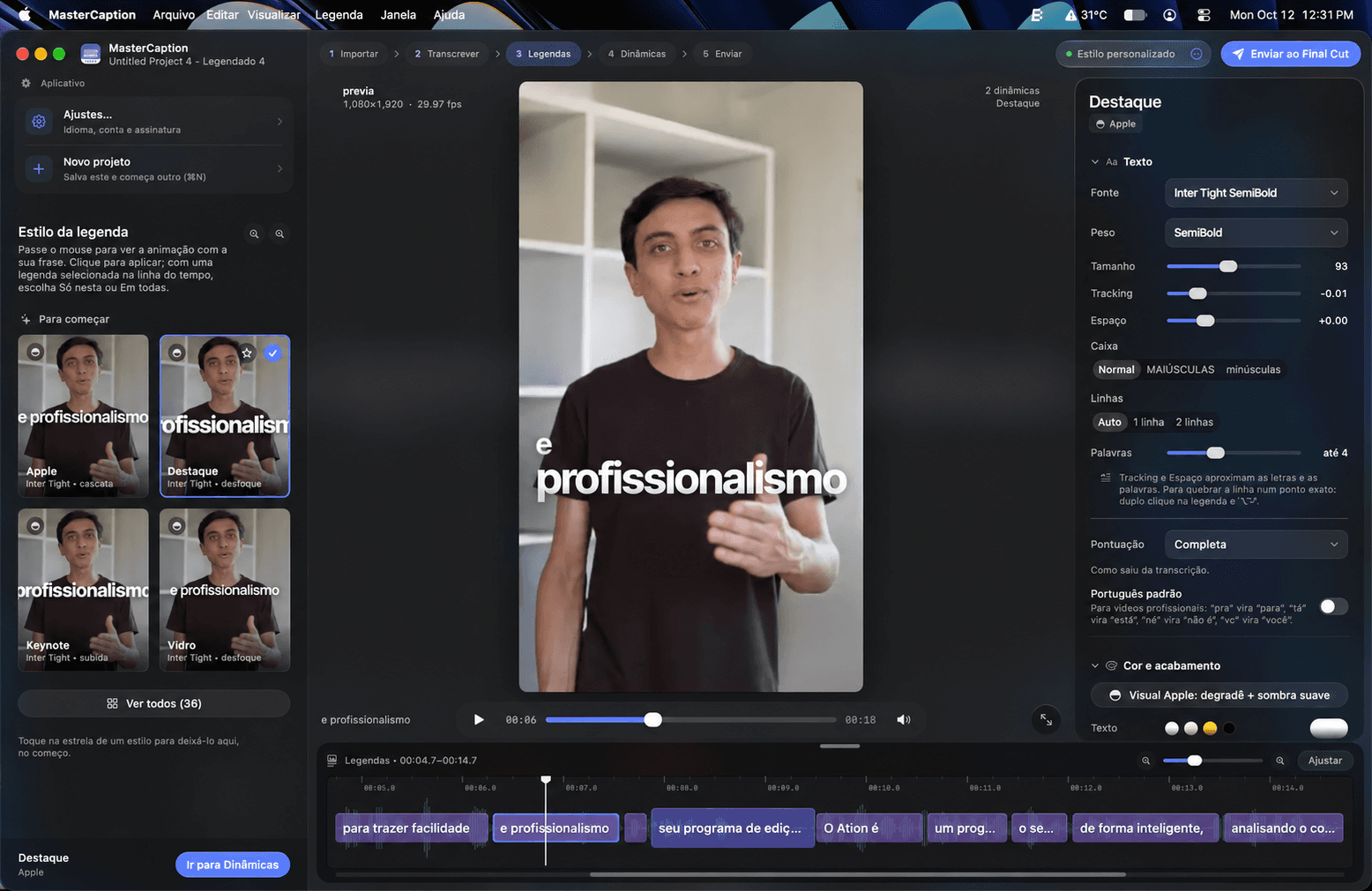
MasterCaption on a 13-inch Midnight M5 MacBook Air: caption styles on the left, video preview in the center, text settings on the right and timeline below.
In sync with your voiceEditable in your timelineLocal on your MacWith your own style
Viral dynamic styles

See the results
For yourself

A guided workflow

Just follow the app!

Illustration of the MasterCaption interface
Words in context

Meaning is partof the edit, too.

MasterCaption considers pauses, punctuation and words that belong together to suggest more natural breaks. Review and adjust them whenever you like.

The same speech. A more natural read.

Discover

* For illustration purposes only.
Your signature in every word

Start with a style.
Make it your own.

Choose a starting point and add your touch. Font, color, size and position: you decide how your message looks. You can even save it as a preset.

Interactive preview
Yourstorycomes to life.
Try the controls.MasterCaption
Make it yours
Style
Highlight color
100%
Position

A preview of the app’s styles. In MasterCaption, you customize captions directly over your video.

From words to motion

See MasterCaption in action.

A real video. Word by word, in time with the voice.

On-device processing

On your Mac.
In your control.

Models are downloaded when you first use the app. After that, transcription runs locally, without sending your audio to a transcription service.

Explore local processing
From audio to Portuguese

Different voices.
Captions in Portuguese.

The audio language is detected automatically. Captions are created in Brazilian Portuguese, with local translation when needed and text ready for you to review.

How languages work
Choose your access

The complete MasterCaption.
More possibilities ahead.

One payment. All future MasterCaption updates included.

Lifetime license

One payment to use MasterCaption on your Mac.

Launch price · One-time paymentUS$ 49.90Launch price US$ 49.90 until December 31, 2026. From January 1, 2027, US$ 99.
  • Full Mac app
  • Use on up to 2 Macs
  • Captions and dynamic styles
  • Editable titles in Final Cut Pro
  • Local processing on your Mac
  • All future MasterCaption updates

Currency and applicable taxes will be confirmed at checkout.

Full refund within 14 days of purchase. Read the refund policy

Seller: Rai Damasceno de Oliveira

Apt 20, Kincora Hall, Shannon, Co. Clare, V14 KC78, Ireland

support@mastercaption.com
EVERYTHING CLEAR BEFORE YOU START

Good questions.
Straight answers.

See what belongs in
your next creative workflow.

MasterCaption combines transcription, word-by-word animated captions and impact combos in a workflow built for Final Cut Pro editors. The result arrives in your timeline as native titles you can keep editing.

Deliver more. In less time.

Don't leave Final Cut behind.
Add what was missing.

Turn hours of work into minutes with a faster, simpler and smarter editing workflow. Create more without compromising quality.

Get MasterCaptionMade for Mac. Built for editors.